


The $15 Dashboard Resurrection Kit
The old Android tablet in your drawer is one 15-minute setup away from being a wall dashboard. Nobody has made that setup reliable.
There is a specific kind of electronic purgatory sitting in millions of American homes. The tablet still turns on. The screen is perfect. Wi-Fi connects. The battery is mediocre but functional. It is simply too slow, too old, or too irritating to be anyone's primary device, so it lives in a drawer next to the charging cables nobody can identify.

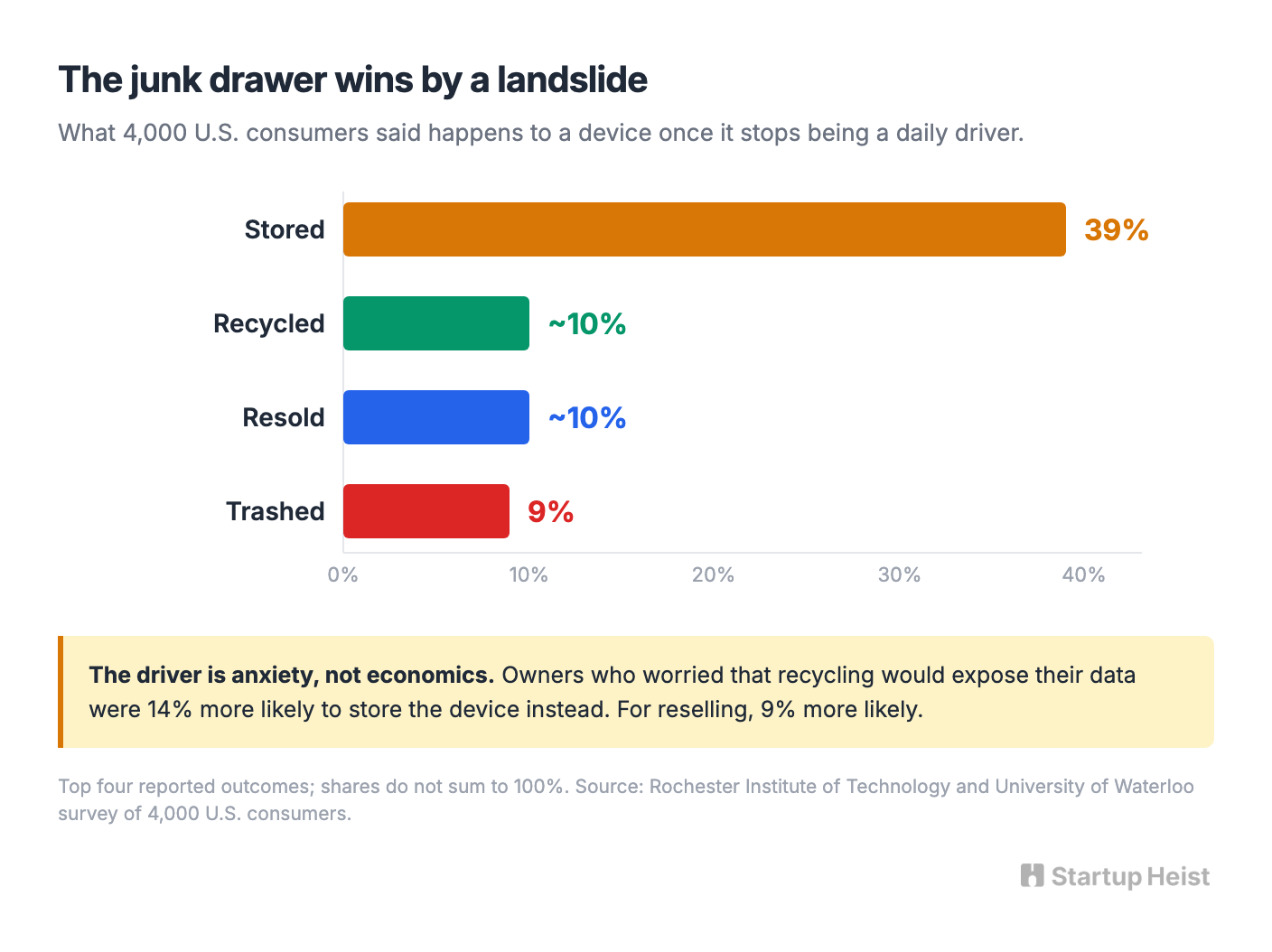
A team from the Rochester Institute of Technology and the University of Waterloo surveyed 4,000 American consumers about what actually happens to a device once it stops being a daily driver. Thirty-nine percent of the time, the owner just stored it. Roughly one in ten got recycled, roughly one in ten got resold, and nine percent went in the trash. Storage wins by a wide margin, and the driver is closer to anxiety than economics. Owners who worried that recycling or reselling would expose their data were 14 and 9 percent more likely to keep the device instead.
Meanwhile, the same household will happily spend $129.90 on a SONOFF NSPanel Pro 120, a 4.7-inch in-wall smart home control panel, or $150 to $300 on a purpose-built family calendar display. A dead 10.1-inch tablet in a drawer is worth nothing. A live 4.7-inch panel on a wall is worth $130.
The gap between those two numbers is where a software business lives.
The money: 1,500 devices a month at $14.99 is roughly $22,500 gross. Fully Kiosk already proved people pay for this at $10.99.
Inside:
• Four-system MVP built around a device scanner
• Six-week build plan, week six is abuse testing
• Pricing ladder from free scan to $29/yr cloud
• The compatibility dataset that becomes the moat
This is not an operating-system project. No custom firmware, no heroic attempt to jailbreak a decade of abandoned hardware. The whole thing is a $10 to $20 Android setup kit that turns an old tablet into a single-purpose wall dashboard in under 15 minutes.
Reliable is where all the work sits. Opening a webpage full-screen is trivial. Keeping a seven-year-old tablet on a wall for six months without it sleeping, dropping Wi-Fi, crashing its browser, throwing an update dialog, cooking its battery, or dumping your mother-in-law onto the Android home screen is the actual product.
The Heist
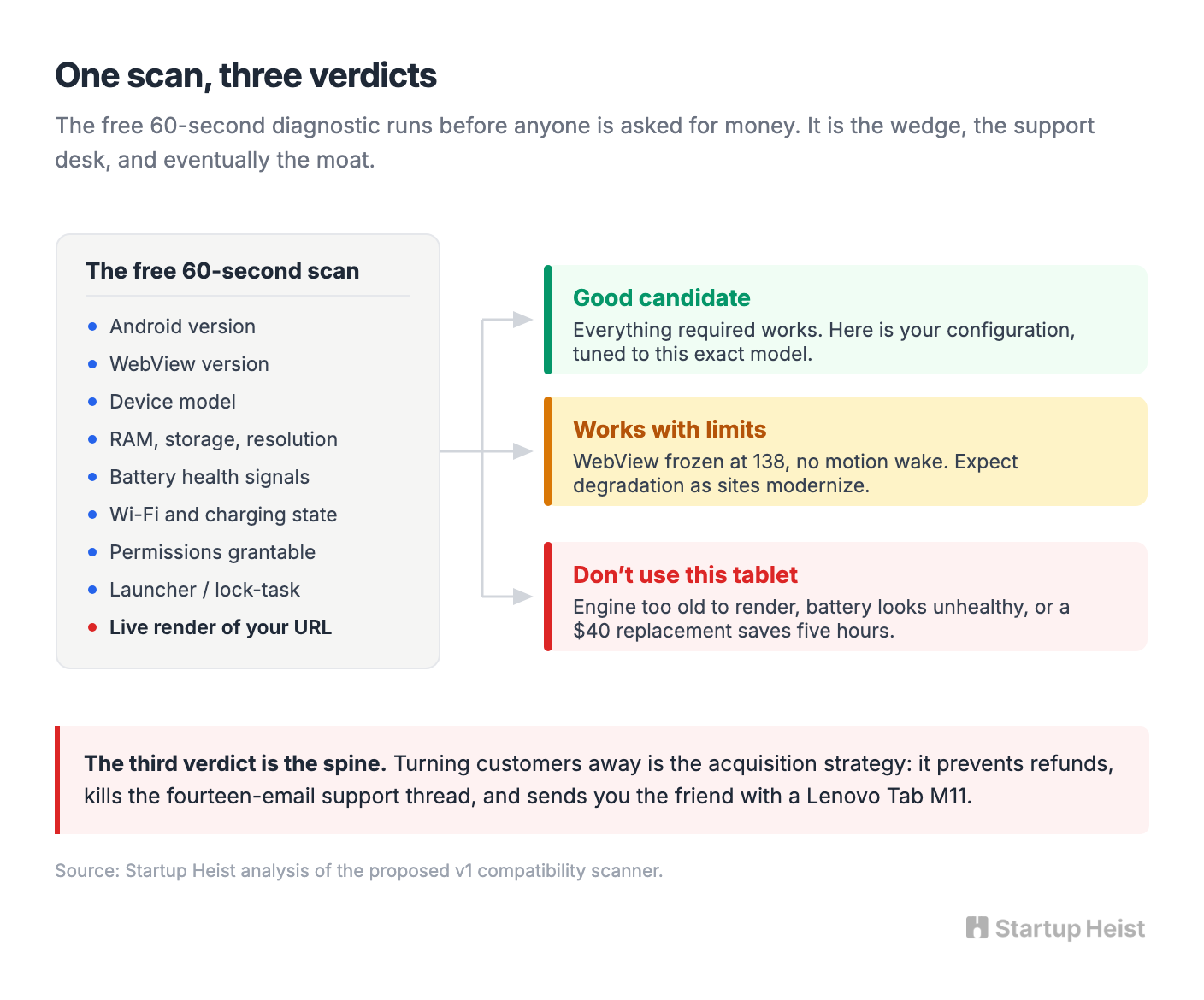
Every free kiosk browser already promises to turn your old tablet into a dashboard. The pitch that sells is narrower: we tell you whether your old tablet is worth using, configure it correctly, and keep the dashboard running. That moves you out of the commodity kiosk category and into dashboard reliability software, where the value is diagnosis and uptime rather than a fullscreen toggle.
The first beachhead is Home Assistant. At its April 2025 State of the Open Home event, the project reported going from one million to more than two million active installations over the course of 2024. These are unusually good customers: technically capable enough to own spare hardware and build a dashboard, and specifically uninterested in spending a Saturday debugging Android WebView.
The ecosystem already treats tablets as control surfaces. Home Assistant's own Android app can be set as the device's default launcher, so the tablet boots straight into the dashboard and the home button returns to it. For anyone selling kiosk software that sounds like bad news. Read it instead as a map of where not to compete.
Don't build another fullscreen Home Assistant launcher. Home Assistant gives that away. Own everything around the screen: whether this specific tablet is a viable candidate, whether its browser can still render a modern dashboard, whether the battery is safe to leave plugged in indefinitely, why the screen went blank at 3am, why it never came back after the router rebooted, and how to rebuild the whole thing on a replacement device in four minutes. That's where the friction lives, and because the hardware costs the customer nothing, $14.99 to make it useful again reads as cheap.
The Hardware Outlives the Browser
An old tablet almost never fails as hardware. The panel works, the radio works, the SoC is more than fast enough to paint a dashboard. What fails is the rendering engine, and it fails on a published schedule you can look up in advance.
Android WebView is the component that draws web content inside an app. On Android 7, 8, and 9, WebView ships inside Chrome, so its fate is tied to Chrome's support window. Chrome 119, released in late 2023, was the last version to support Android 7. Chrome 138 was the last to support Android 8 and 9; support ended with the release of Chrome 139 on August 5, 2025. Anything running Android 9 or older is now frozen at a rendering engine that stopped receiving updates, and the modern web keeps moving. Android 10 and above still get updates, because WebView became an independently updatable system component.
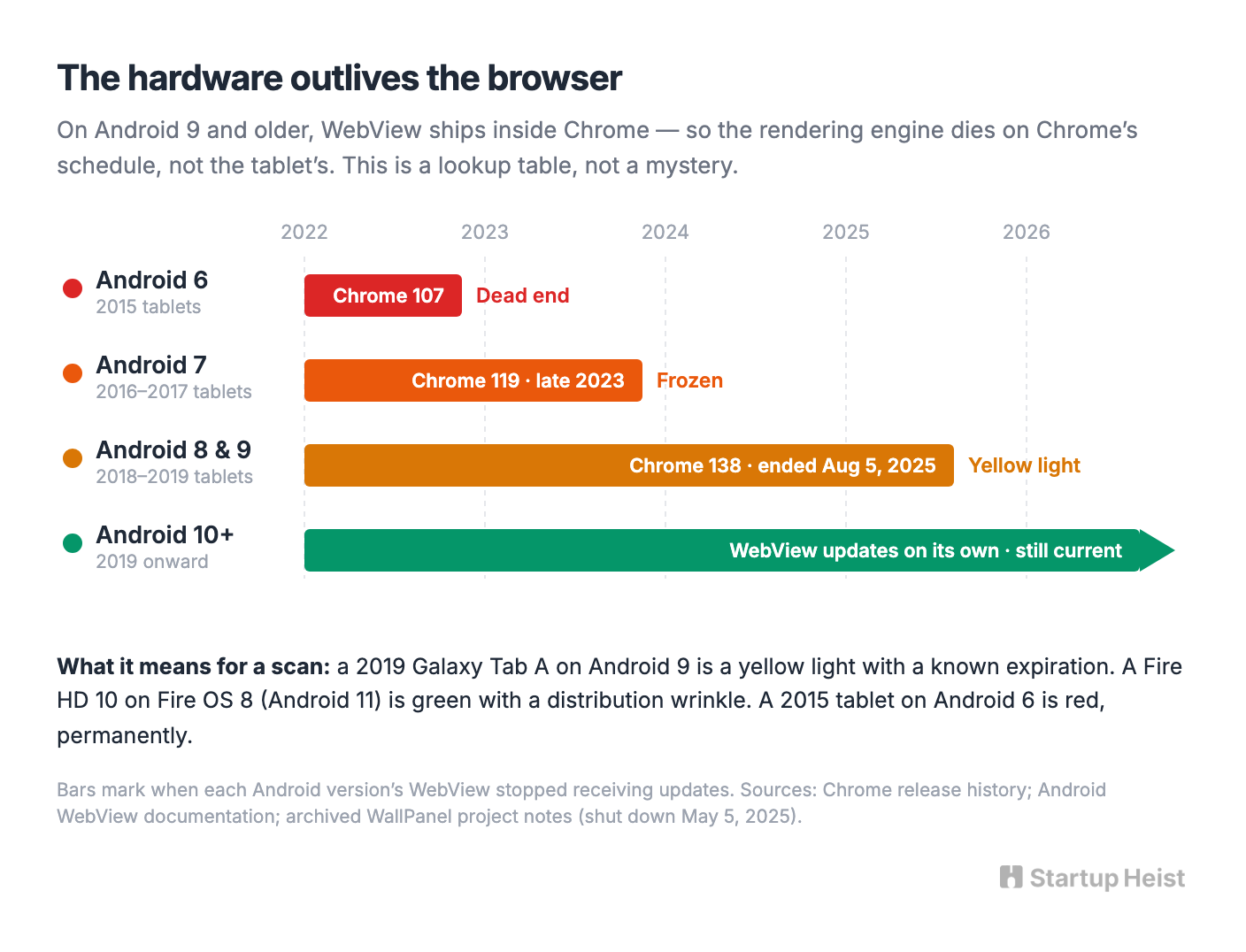
That single fact converts a messy support problem into a lookup table. A 2019 Galaxy Tab A running Android 9 is a yellow light with a known expiration. A Fire HD 10 on Fire OS 8, built on Android 11, is a green light with a distribution wrinkle, since Amazon tablets have no Google Play and need the Appstore or a sideload. A 2015 tablet stuck on Android 6 is a red light and always will be, because Chrome dropped it back at version 107.
The archived WallPanel project, an open-source Android dashboard app whose maintainer shut it down on May 5, 2025 rather than keep limping along, warned users about exactly this: if the dashboard renders blank, the WebView version is usually the culprit, and sometimes the only fix is a different device. Nobody has turned that warning into a product.
The Junk Drawer Keeps Filling
The macro backdrop supports the behavior even if it doesn't size the market. The UN-backed Global E-waste Monitor recorded 62 million tonnes of electronic waste generated in 2022, growing by roughly 2.6 million tonnes a year and on track for 82 million tonnes by 2030. Only 22.3 percent was documented as properly collected and recycled. The underlying consumer condition is permanent: people own functional electronics that have lost their purpose, and they feel bad about it.
"Use the screen you already own" is a strong acquisition hook, so lean on the money it saves rather than the planet it spares. A swollen lithium battery trickle-charging on a wall for three years is no sustainability win, and pretending otherwise will eventually cost you.
The Market Is Small, and the Competition Is Cheap
Be honest about the ceiling. Two million Home Assistant installs is a strong starting audience, but only a slice wants a dedicated tablet, a smaller slice owns suitable hardware, and plenty will configure everything themselves for sport.
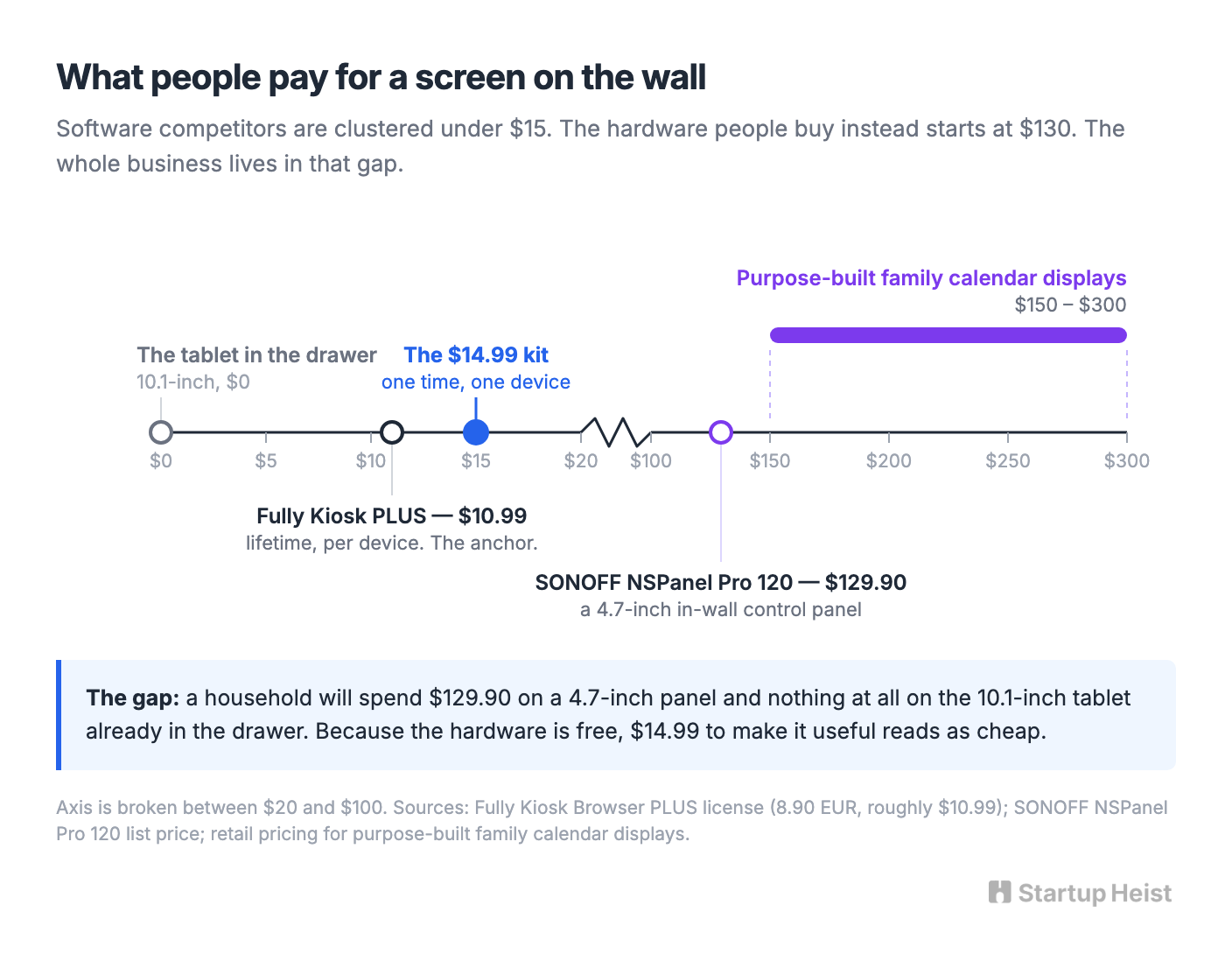
The price anchor is already set, and it's low. Fully Kiosk Browser sells a lifetime PLUS license at 8.90 euro, about $10.99 in the US, one time per device, and it includes fullscreen operation, kiosk controls, motion detection, remote administration, provisioning, MQTT, and an API. Home Assistant gives away launcher mode. WallPanel was free until its maintainer walked away. You aren't charging $49 for a prettier version of any of that.
That constraint is also the opening. The free and cheap tools have covered the easy half of the problem for years, and the hard half, figuring out which junk-drawer tablet is worth mounting and keeping it alive afterward, is exactly the part that made a maintainer quit.
The Product: Four Systems
Ship version one with four pieces and nothing else.
Unlock the Vault.
Join founders who spot opportunities ahead of the crowd. Actionable insights. Zero fluff.
“Intelligent, bold, minus the pretense.”
“Like discovering the cheat codes of the startup world.”
“SH is off-Broadway for founders — weird, sharp, and ahead of the curve.”


